
STEP 4: Assign DVR's IP

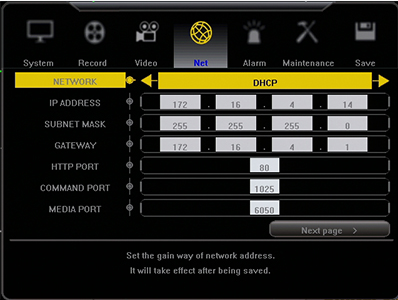
Under NETWORK, change the selection to DHCP and hit SAVE at the top. Next exit back to the camera screens and allow the DVR to reboot.
Once the DVR has rebooted, go back to the Network Section and write down the following information:
IP Address:
Subnet Mask:
Gateway:
Once the DVR has rebooted, go back to the Network Section and write down the following information:
IP Address:
Subnet Mask:
Gateway: