
STEP 8: Changing ActiveX Settings

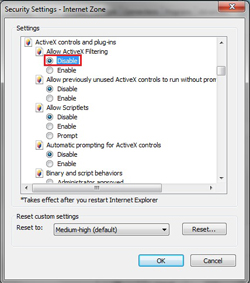
Scroll down until you see ACTIVEX CONTROLS AND PLUG-INS.
If you have Internet Explorer 9, change ALLOW ACTIVEX FILTERING to DISABLE. (other versions of IE will not have this option)
If you have Internet Explorer 9, change ALLOW ACTIVEX FILTERING to DISABLE. (other versions of IE will not have this option)